DevOps
Sold by: 嘉为科技
An integrated DevOps platform from code submission to production delivery — continuous integration and native integration of product management to make software delivery faster, more stable, and more controllable.
Overview
Image
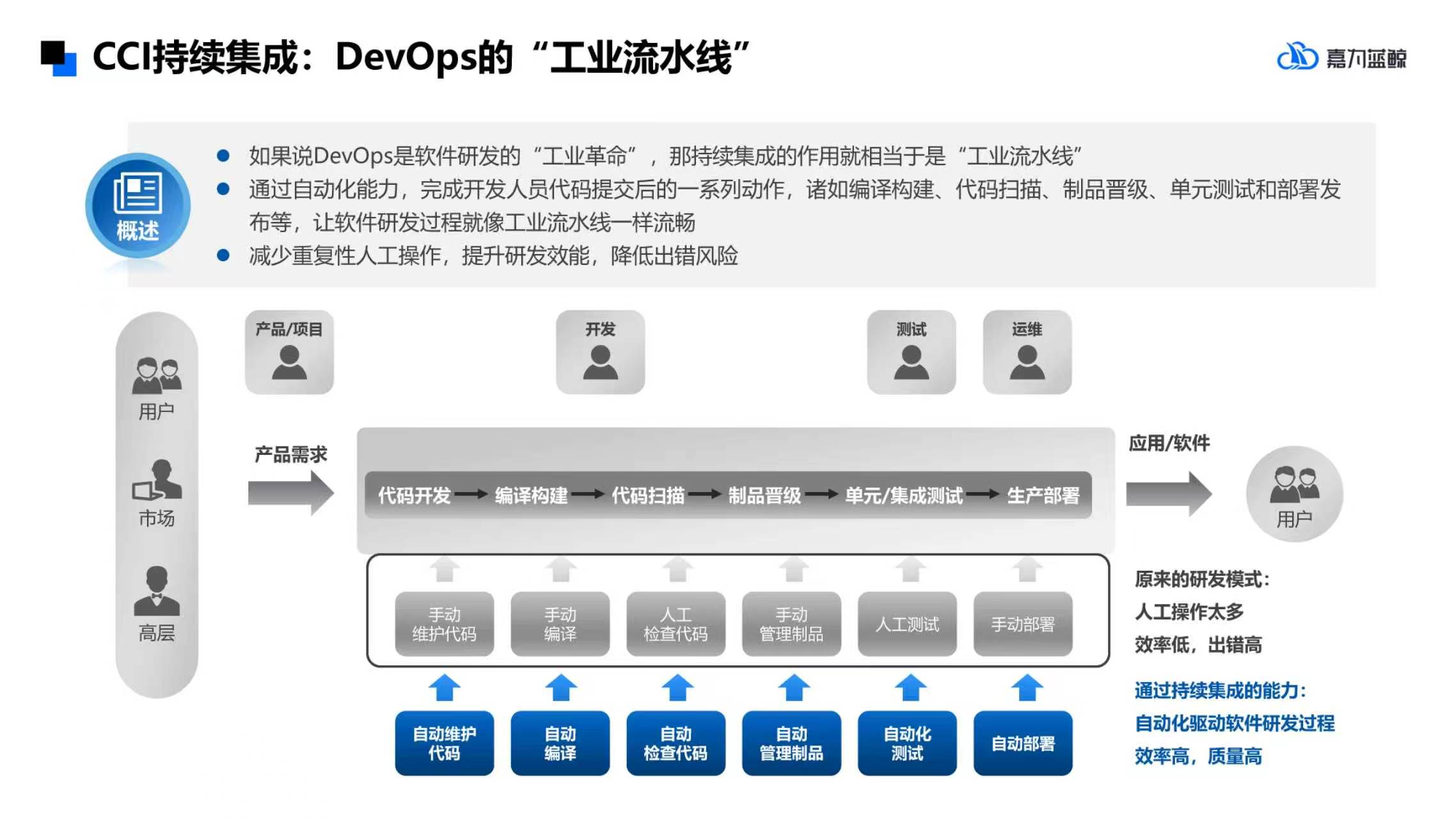
CCI continuous integration: the “industrial assembly line” of DevOps
Image
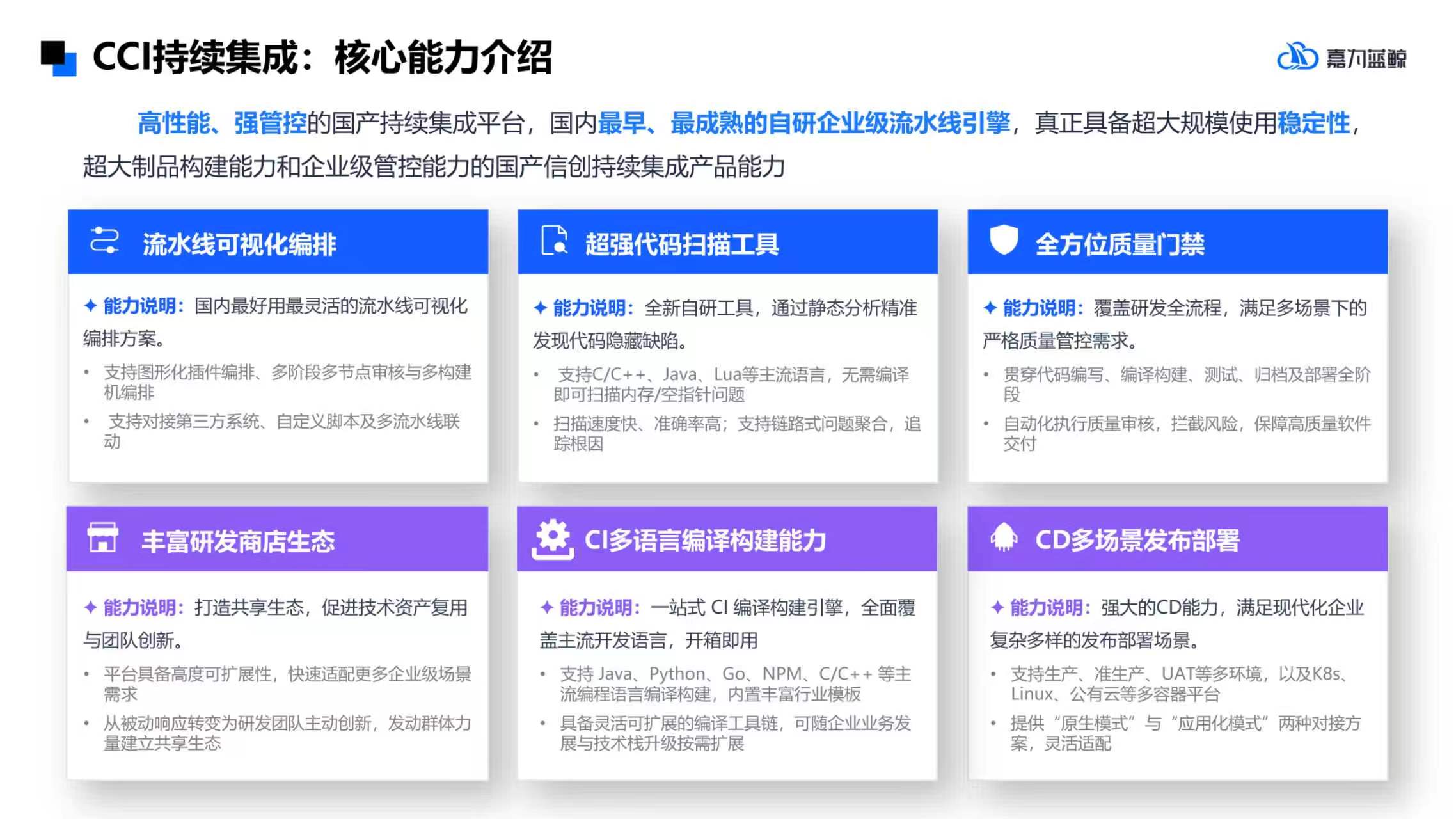
CCI Continuous Integration: Introduction to Core Competencies
Image
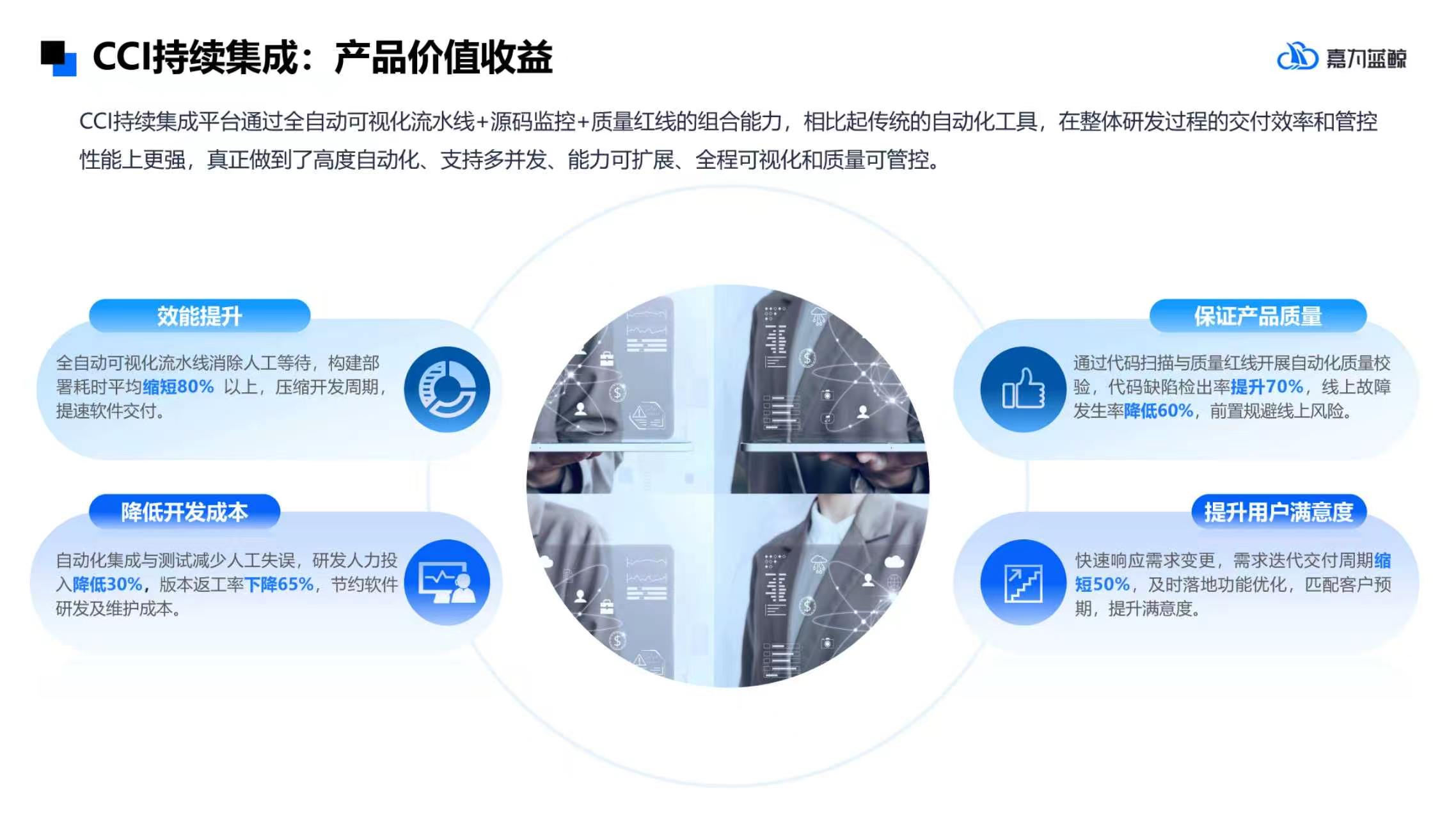
CCI Continuous Integration: Product Value Benefits
Image
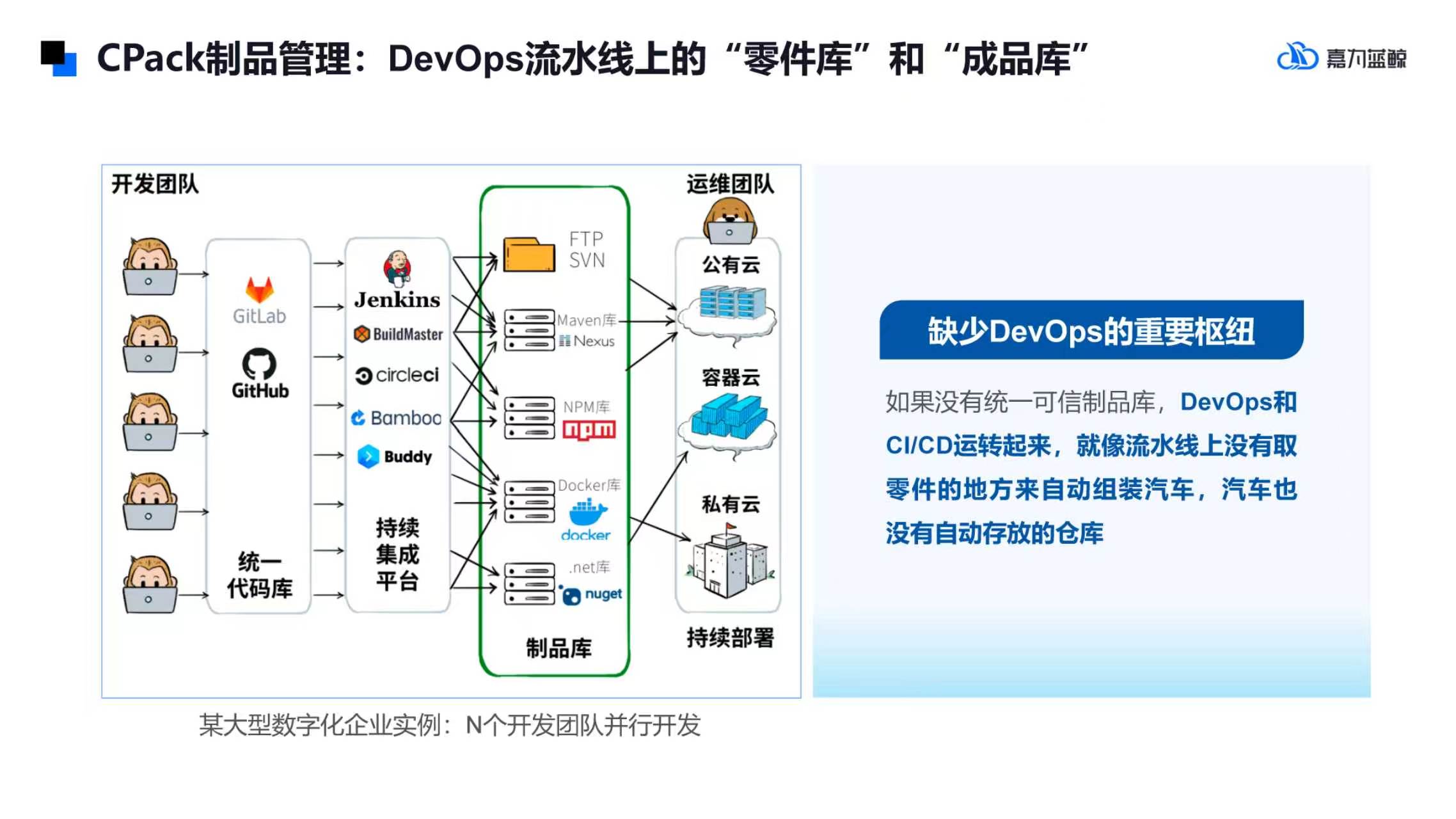
CPack Product Management: “parts library” and “finished product library” on DevOps assembly lines
Image
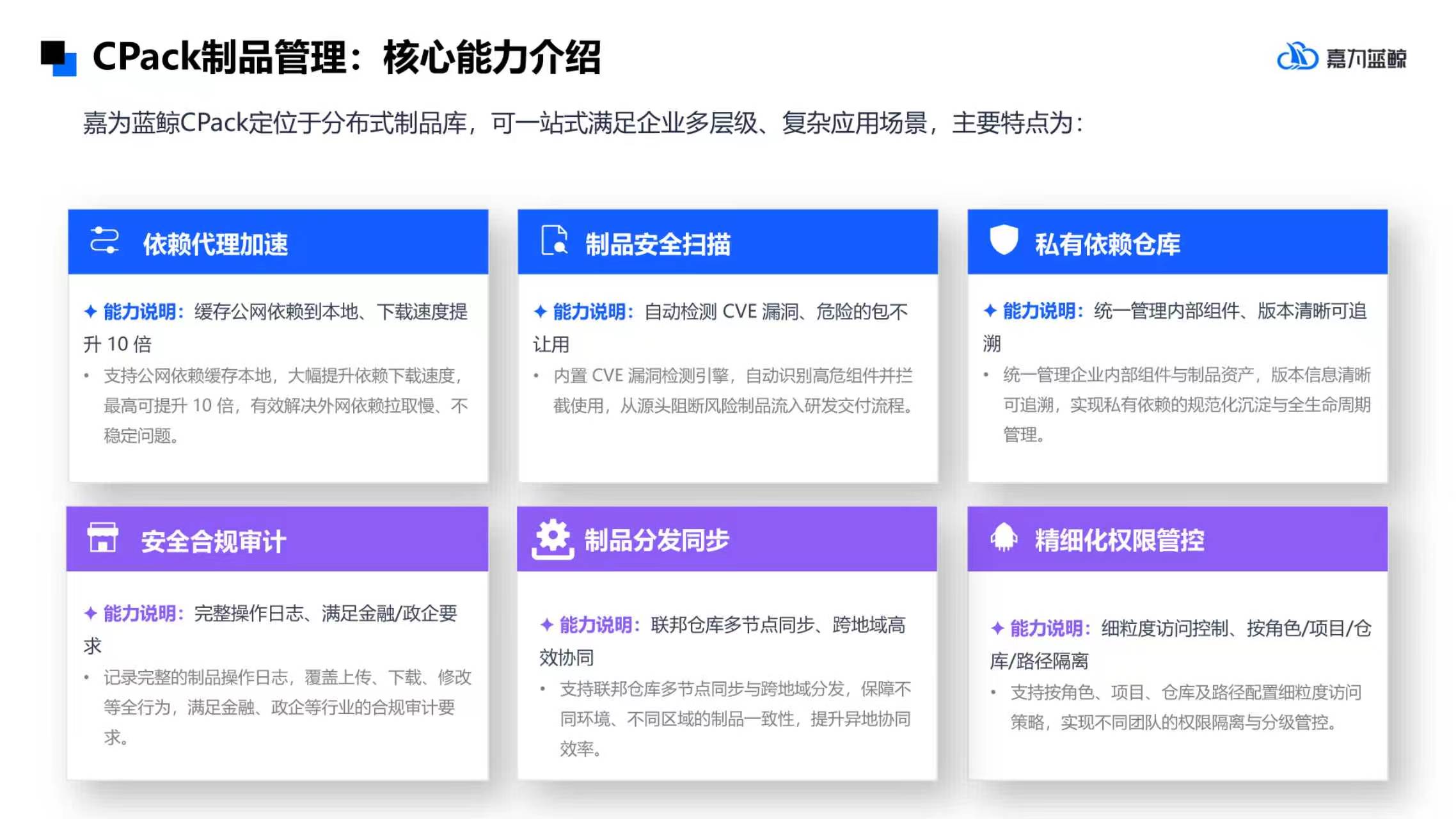
CPack Product Management: Introduction to Core Competencies
Image
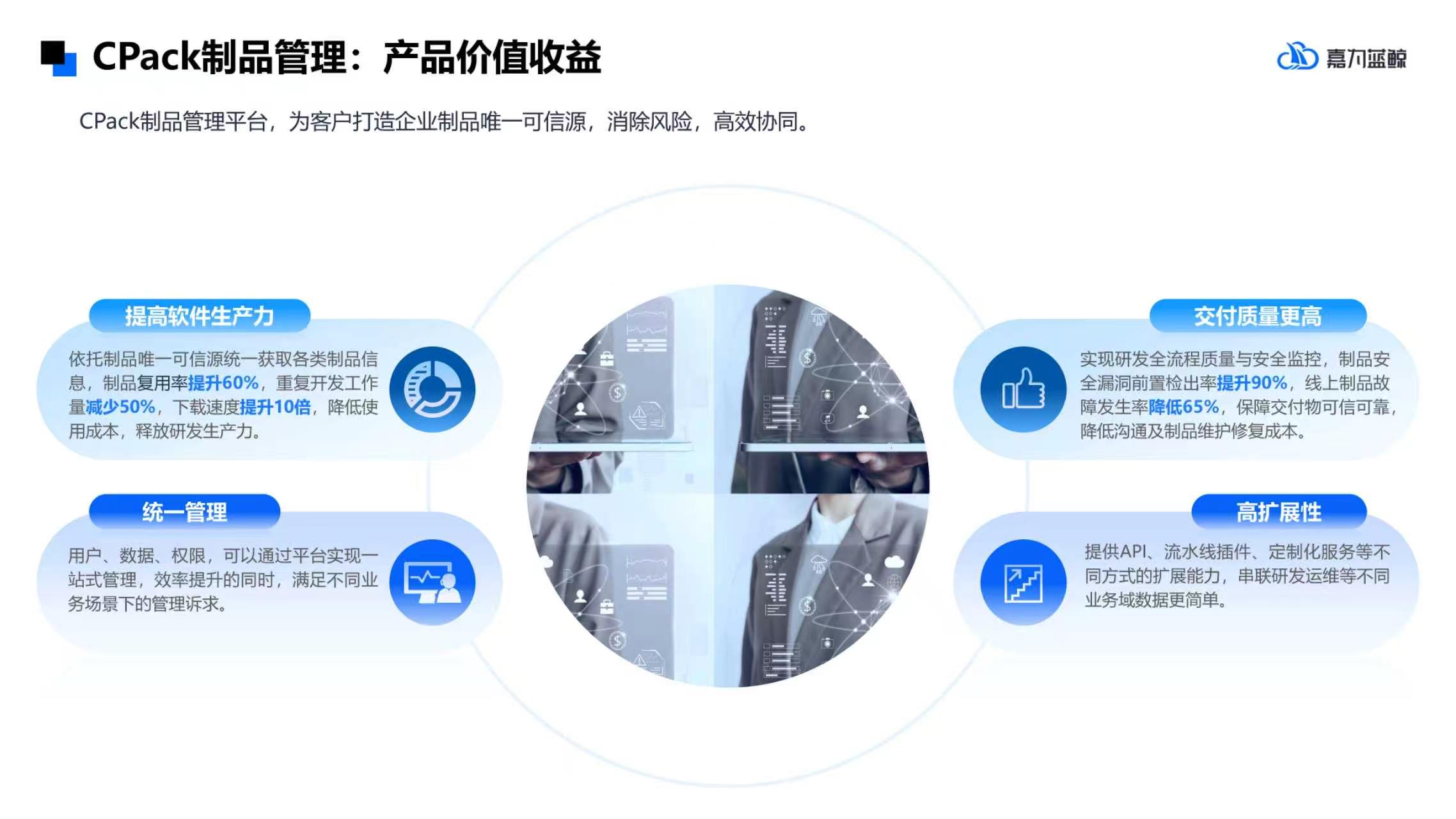
CPack Product Management: Product Value Benefits
Jiawei Blue Whale DevOps is a domestic self-developed one-stop R&D efficiency solution that helps enterprises implement standardized and secure software delivery processes and improve R&D delivery efficiency. Provides CCI continuous integration pipeline and CPack product management platform. The CCI pipeline supports code inspection, flexible construction, automated packaging, and strict code quality control. CPack is compatible with many types of products, provides version management, vulnerability scanning, national secret encryption and full link traceability, establishes a secure line of defense in the software supply chain, and meets the requirements of information technology innovation and equal security compliance.
Highlights
- CCI continuous integration: -Domestic self-research, process visualization -Full stack compatible with domestic information technology innovation - Accelerate compilation to achieve real “efficiency gains” - Quality can be controlled - Super performance support
- CPack Product Management: -Domestic self-research -Remote multi-node distribution capability - Corporate private service capabilities -Product safety capability Highly available and scalable deployment
Details
Sold by
Delivery method
Delivery option
64-bit (x86) Amazon Machine Image (AMI)
Latest version
Operating system
AmazonLinux 2023.12.20260914.0 x86_64
Pricing
DevOps
Pricing and entitlements for this product are managed through an external billing relationship between you and the vendor. You activate the product by supplying a license purchased outside of Amazon Web Services Marketplace China, while Amazon Web Services provides the infrastructure required to launch the product. Amazon Web Services Subscriptions have no end date and may be canceled any time. However, the cancellation won't affect the status of the external license.
Additional Amazon Web Services infrastructure costs may apply. Use the Amazon Web Services Pricing Calculator to estimate your infrastructure costs.
Vendor refund policy
Returns and refunds are currently not supported, if you have questions, 请联系partner@canway.net
Legal
Vendor terms and conditions
Upon subscribing to this product, you must acknowledge and agree to the terms and conditions outlined in the vendor's End User License Agreement (EULA) .
Content disclaimer
Vendors are responsible for their product descriptions and other product content. Amazon Web Services Marketplace China does not warrant that vendors' product descriptions or other product content are accurate, complete, reliable, current, or error-free.
Usage information
Delivery details
64-bit (x86) Amazon Machine Image (AMI)
Amazon Machine Image (AMI)
An AMI is a virtual image that provides the information required to launch an instance. Amazon EC2 (Elastic Compute Cloud) instances are virtual servers on which you can run your applications and workloads, offering varying combinations of CPU, memory, storage, and networking resources. You can launch as many instances from as many different AMIs as you need.
Version release notes
Jiawei Blue Whale DevOps is a domestic self-developed one-stop R&D efficiency solution that helps enterprises implement standardized and secure software delivery processes and improve R&D delivery efficiency. Provides CCI continuous integration pipeline and CPack product management platform. The CCI pipeline supports code inspection, flexible construction, automated packaging, and strict code quality control. CPack is compatible with many types of products, provides version management, vulnerability scanning, national secret encryption and full link traceability, establishes a secure line of defense in the software supply chain, and meets the requirements of information technology innovation and equal security compliance.
Additional details
Usage instructions
Delivery Details 64-bit (x86) Amazon Machine Image (AMI)
An Amazon Machine Image (AMI) AMI is a virtual image that provides the information needed to launch an instance. Amazon EC2 (Elastic Compute Cloud) instances are virtual servers for running applications and workloads, providing different combinations of CPU, memory, storage, and network resources. You can use the AMI to launch one or more instances as needed.
Product deployment instructions
- Select the x86_64 architecture to launch the instance.
- Configure access Configure reachable IPs for the instance. Security group TCP 8443 is only open to the administrator IP. The product opens TCP 80 when using HTTP and TCP 443 when using HTTPS. When SSH management is required, only TCP 22 is open to the administrator IP.
- Method 1 to obtain the initial access code: Select the instance in the EC2 console, open Operation, Monitoring and Troubleshooting, obtain system logs, search AWS-CLOUDAPP SETUP, and copy the access code. Method 2: Log in to the new instance with SSH and execute the following command: sudo python 3 -c 'import json; print (json. load (open (“/var/lib/aws-cloudapp/setup-access/identity.json”)) ["token"]) '
- Open the initialization page and visit https://实例IP:8443,输入访问码 . The initialization portal uses a self-signed certificate. Please check the Certificate SHA256 fingerprint in the instance system log before continuing. The same tab refresh automatically restores login and deployment progress.
- Fill in the deployment information, select CPack or CCI, fill in the customer ID, root domain name, and select HTTP or HTTPS. When the root domain name is test.com, the platform address is devops.test.com. Business HTTPS must use a valid certificate issued by a trusted CA; self-signed certificates are not accepted. Please upload the full PEM certificate chain and the matching unencrypted private key. The certificate must cover the business domain name listed on the page. After uploading, an attempt will be made to identify the root domain, so please check the results. HTTP requires no certificate upload. Follow the instructions on the page to configure DNS to point to the reachable IP address of the instance. For public network services in mainland China, please complete the domain name registration as required. An HTTPS certificate cannot replace the filing.
- Deploy and Use Click to start automatic deployment, and view the current steps and deployment logs on the page. Refreshing or closing the page does not interrupt deployment. If it fails, try again with the same configuration. Once complete, access the platform via a link on the page. Please contact the seller offline for product licensing, number of users and expiration dates. After verification is complete, it is recommended that port 8443 in the security group be closed.
Resources
Vendor resources
Support
Vendor support
Support time: 5*8 working days (9:00-18:00) Support hotline: 020-38847288
Amazon Web Services infrastructure support
Amazon Web Services Support is a one-on-one, fast-response support channel that is staffed 24x7x365 with experienced and technical support engineers. The service helps customers of all sizes and technical abilities to successfully utilize the products and features provided by Amazon Web Services.
Customer reviews
Ratings and reviews
0 ratings
0 reviews
No customer reviews yet
Be the first to review this product .